google

Visitor

...Website Hot News... All Mobile Phone Flash And Unlock Here: Contact Now Milon Telecom milontelecom007@yahoo.com Domin Hosting Low Price Contact milontelecom007@yahoo.com......mobile.+8801727171716 ,,

Lenovo A6000 FRP Lock Remove Solution

Lenovo A6000 FRP Lock Remove Solution

Posted in
No comments
By naeem
How To Remove FRP Lock From Lenovo A6000
Lenovo A6000 Hard Reset Solution
Remove Pattern Lock From Lenovo A6000
Want to Know What is FRP Lock ?
Android Factory Reset Protection (FRP) is a new feature to protect your device which has been added to several devices that are running Android OS 5.1 or higher.
This feature allows you to set up your device to prevent other people from using it if it’s been reset to factory settings without your permission.
For example, if your device is lost, stolen, flashed, or wiped, only someone with your Google account or screen lock information can perform a factory data reset and use the device.
When a device is factory reset, the device will not be able to be setup without the user entering the Google Account associated with the device (for hard reset) or screen lock information (for reset in Settings menu).


Hello,
Here is little frp remove tool on Qualcomm phones. LENOVO FRP
First full process (for Lenovo )
Press volume down key then press power key in power off mode to enter fast boot mode.
open script and press 1 to remove frp
Wait for phone to boot up fully, done

Download Link

Intex Aqua Desire HD Flashing Tool Driver and Flash File

Intex Aqua Desire HD Flashing Tool Driver and Flash File

Posted in
No comments
By naeem

Intex Aqua Desire HD Flashing Tool Driver and Flash File 


This flash file tested by me without any error working well,  you can use this flash file when your device hang on logo problem, restarting problem, security lock problem, password lock problem, pattern lock problem etc software related problem and you can use this tutorial without any box and this is free for all who know about software in mobile, impotent for flashing first must check your micro usb cable if not good then you can't flash it so check micro usb cable second check your device battery that is impotent for flashing if your device battery low so stop your device between flash so this is impotent for flash, before you flash save your data like contact, photos, videos etc because this is factory flash file so you can't save after full flash so must remember all are impotent notes.

Requirement for Upgrade:

Method:


Samsung Galaxy A series, J Series, S Series, Edge, Note, Tab Bypass Google Account done Without OTG Cable

Samsung Galaxy A series, J Series, S Series, Edge, Note, Tab Bypass Google Account done Without OTG Cable

Posted in
No comments
By naeem

Samsung Galaxy A series, J Series, S Series, Edge, Note, Tab Bypass Google Account done Without OTG Cable

This is good method for Samsung Galaxy A3, A5, A7, J1, J2, J3, J5, J7, S5, S6, Edge, Note, Tab series google bypass Gmail account (FRP) for this method not required OTG cable you can do from app or Samsung official software before use must reemmber which required remember on mind because any one not working you can't done this job must be working well all are required in this method you can't save any type data like contacts, photos, videos, Email or other if to be in SD Card data it's safe if to be in internet storage then you can't save will be lost.


In this method some impotent of Micro usb cable, Phone battery, USB Driver in this any missing also you can't done job, many micro USB cable in the market but not all are working means working in some device, i suggest you use Samsung original USB Cable so you can easy done, mobile battery must be charged do not try in low battery, USB Driver must be installed in your Computer or Laptop if you don't have just download from below link.


This method use in lollipop 5.0.1 i think this work in also 6.0.1 version, if you use in 6.0.1 and it's done just leave your comment so many technician take benefit because from the many time required of google bypass Gmail account on 6.0.1 version.


Required for Bypass Gmail Account

1. Above mention device any but in must be chared battery up to 80% and do not try with low battery

2. Samsung Sidesync software this must be installed in your computer

3. com.sika524.android.quickshortcut.apk file

4. Micro usb cable

5. Computer or Laptop

6. Samsung Android USB Driver

Method for Bypass Gmail Account

1. Open Sidesync it on desktop, if not installed Download from here

2. Take handset on hand and click on Arrow button (Yellow Arrow)

3. Choose your Wi-fi connection and connect it

4. Now Click on NEXT button again click on NEXT button choose AGREE

5. After device asked Verify your account here do not any enter email

6. Attach USB Cable to device from computer

7. On device Display to be 3 option 1. Galaxy Apps 2. Chrome 3. Internet

8. Here Choose Chrome option

9. Click on ACCEPT & CONTITNUE option and again choose NO THANKS option

10. Click in the Search bar and type : http://j.mp/BuntyGSM After you will redirect to original link

11. There to be com.sika524.android.quickshortcut.apk click on that this apk must download

12. After Download click on BACK button until Terms and Conditions page

13. Click on AGREE button

14. Click on UPDATE button in Samsung Galaxy Apps wait until update

15. Now click on Samsung GALAXY Apps option

16. Click on SEARCH button it to be top and Type : ES File Explorer after Download and Install it

17. Must Account Created in Samsung Account if not just click on CREATE Account and create it first and login

18. If you have already account, just click on SIGN IN and Enter ID or Enter password

19. Install ES File Explorer apk file

20. Open ES File Explorer apk file

21. Choose Download folder and open com.sika524.android.quickshortcut.apk file

22. Click on SETTINGS and select Unknown sources enable it click on

23. Choose INSTALL option after Choose OPEN

24. Type : Google Account Manager in Input keyword to filter option

25. Click on arrow and choose Google Account Manager which Type Email and Password's

26. Click on Try option Go to more option like three dot click there and choose Browser Sign-in and Enter your own account which you know id or password after Entered it then restart phone

27. Now click on Arrow (yellow's color) i hope your wi-fi connection already connected after click NEXT and AGREE

28. After you can see Account added click NEXT now you see GET your apps & data there you see Restore from this backup click there and choose Set up as new device click done and click NEXT, SKIP, SKIP ANYWAY, MORE Two time, NEXT, Back up and sync click Later, Add fingerprint also choose Later, NEXT, FINISH

29. Now Go to Apps, click on Settings, click on Backup and reset, Go to Factory data reset, RESET DEVICE, DELETE ALL wait until Start device

30. Choose your Language and setup phone like first buy you had done

31. Congratulation your are done


How to Samsung New Security Frp Lock Remove Solution

How to Samsung New Security Frp Lock Remove Solution

No comments
By naeem
What is Samsung FRP ( Factory Reset Protection ) ?
Android Factory Reset Protection (FRP) is a new feature to protect your devices that are running Android OS 5.1 or higher. This feature allows you to set up your device to prevent other people from using it if it’s been reset to factory settings without your permission. For example, if your device is lost, stolen, flashed, or wiped,
NOTE : Important! You must set up a Google account in order to utilize the FRP feature. It is highly recommended that you set a secure screen lock on your device. Only someone with your Google account or screen lock information can perform a factory data reset and use the device.


Samsung New Security Frp Lock Remove Solution

Sidesync Click Here To Download
SideSync | Samsung
For Windows:http://downloadcenter.samsung.com/co…c_4.3.0.92.exe
For Mac:http://downloadcenter.samsung.com/co….0.15125_9.dmg
Steps:
1. Download and install SideSync on your pc
2. Open SideSync and connet your Mobile
3. A menu will appear to choose Browser choose Internet Browser
4. Go to alnajat.co/setting.apk —–or——- http://www.kaavu.com/lock.apk ( Credits To Murad Bro )
5. Click on Bookmarks -> History -> Download history
6. Install setting.apk
5. Open Settings.apk and then go to security and make a pin for screen lock 0000
6. Go to Other security settings – > trusted agents -> turn off google smart lock
7. Go to easy mode and choose Easy mode then done
8. Go back to setting.apk and choose standard mode and then done
9. Keep repeating step 7-8 until the home screen appears in normal mode
10. Go to google play, and enter your pin 0000 and set up and new google account
11. Restart the phone once completed, then go to Settings – > accounts and remove the google account
12. Go to download mode and VOILA! …. FRP Lock: OFF
Now to a Factory reset and go through the activation process normally it will not ask for Gmail to activation
I Done This Steps In SAMSUNG NEW SECURITY SM-J700F

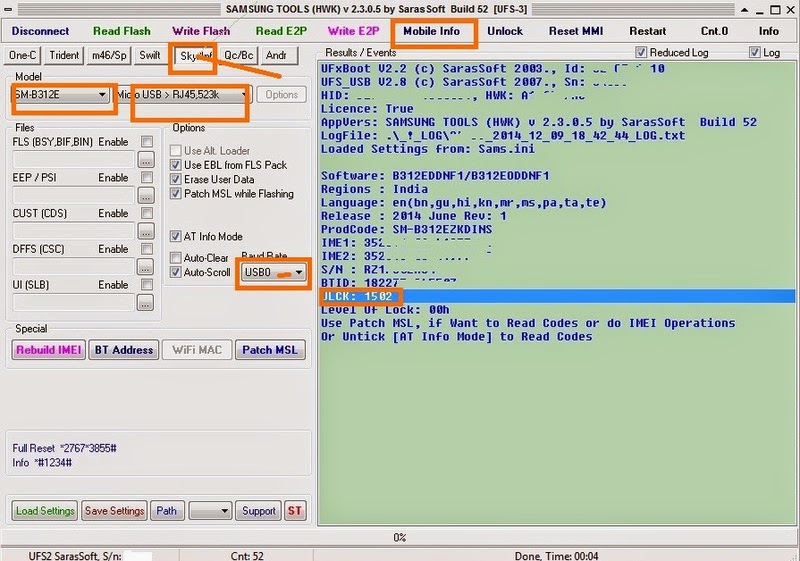
How to unlock Samsung SM-B312E Unlock Done Without Format or Flash

How to unlock Samsung SM-B312E Unlock Done Without Format or Flash

No comments
By naeem

How to remove Samsung S7 SM-G935F FRP Remove Solution

How to remove Samsung S7 SM-G935F FRP Remove Solution

No comments
By naeem
                                                   Samsung S7 FRP Remove Solution 
Samsung SM-G935F FRP Remove Solution 
Samsung S7 New security 6.0.1 Frp Remove Solution


Note: Before trying

* It should work on all country build firmware's as we tested on france,ksa,germany firmware's.

* Battery charge should be at least above 70%

* And the more important thing is you need to keep your phone 7 to 8 hours without plugin in usb or charge
otherwise you will not get the change charging location option.

* After access setting, Go to about simply tap on build nuber to enable developer option
check oem unlock and reset yur phone. 


Video guide here

Setting apk here www.kaavu.com/lock.apk

Password : Get it from attachment

Tested firmwares

SM-G935F XEF-G935FXXU1APC8.zip

SM-G930F XEF-G930FXXU1APC8.zip
 

How To Remove Lenovo A2020a40 FRP Lock Done

How To Remove Lenovo A2020a40 FRP Lock Done

No comments
By naeem
                                                                 Hot News
Worlds First Lenovo A2020a40 FRP Lock Done In Seconds
NO NEED DEBUG
NO NEED ROOT
NO NEED TO FLASH
Simply Process For FRP Lock
Just Switch Off
Press Vol up+Power
After Vibrate Leave Power
But Keep Pressing Vol up
Until Its Show Recovery

In Recovery At Last See Reboot To Boot loader
Now Just Install ADB Driver If Not Install


Now All ullti Palti Shocked But Miracle Always Rocked Still Not Have Worlds NO.1 Box Get One

Article Writer M.H Milon

My All Gsm Friends.And My Site All Firmware.Stock Rom.Solution.Flash File And Others Link Im Post In Free But My Any Link ( Password.Dead.Broken ) To Please Comment Me Im Trying To 1-24 hours Sulve Problem And Trying Post New Link Thanks... http://engineermilon.blogspot.com/.

Published..Blogger Templates. Powered by Blogger.